Building a Wall-Mounted Control Panel for My Smart Home
Too many apps for one home. I’m bringing lights, the front door lock and EV charging together with Home Assistant on a Raspberry Pi—and building a custom dashboard for a hallway tablet.
An app for the alarm, another for the front door, Philips Hue for the lights. As we’ve added more connected devices at home, we’ve also ended up with more apps to keep track of.
I wanted one place to see what’s going on and control the things we use every day. So I set up Home Assistant on a Raspberry Pi and started bringing everything together.
The next part is building a dashboard that feels like it belongs in our home.
A panel for everyday use
The plan is to mount a tablet in the hallway, somewhere central and easy to reach. The dashboard also works from a phone or computer, so access won’t depend on standing in front of the wall panel.
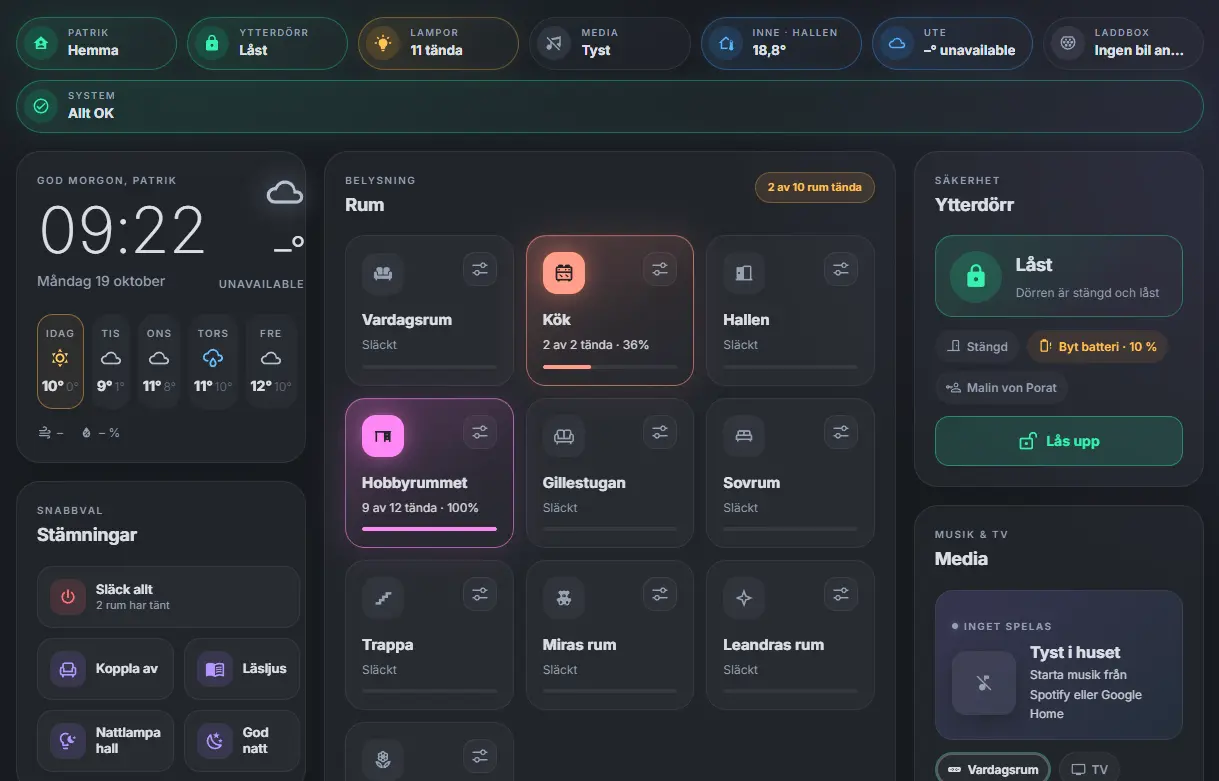
The standard interface felt a little too impersonal for what I had in mind. Inspired by wall panels shared by the Home Assistant community, I started developing my own design: a dark background, glass-like cards and coloured accents that show what’s active.
The room tiles take on the actual color of the lights. Opening a room brings up individual lights, dimmers and Hue scenes. There are also shortcuts for everyday things like turning everything off or switching to reading light.
Bringing things together
So far, I’ve connected Philips Hue, Sonos, Google Nest speakers, the Easee EV charger and our Yale front door lock.
The dashboard brings together lighting, media controls, charging status and the door lock, with an extra confirmation before unlocking. There’s also a clock, weather forecast and a shared shopping list.
It runs directly inside Home Assistant as a custom card, written in JavaScript with HTML and CSS for the interface. That gives me control over the design while using Home Assistant’s existing login, live updates and mobile access.
Still taking shape
This is very much a work in progress. Some parts are working, while others are still being built and adjusted.
Next up are the Tado thermostats and Sungrow solar system, followed by the alarm and robot vacuum. I’ve already started an energy-flow view, ready for when the solar data is connected.
The goal is to make the things we already have easier to use together. Building the dashboard has become an enjoyable project in itself, with plenty to learn along the way.
Continue Reading
Prepped and primed the Eddie figure with Vallejo. Base colors start this weekend.
Writing about music, visual practice, technology, learning and the systems behind the projects.